Ocean freight digitalization: how to cut costs, gain visibility, and future‑proof your shipping

  • DocShipper Team 13 Min
  • Published on April 28, 2023 Updated on January 6, 2026
img

In short ⚡

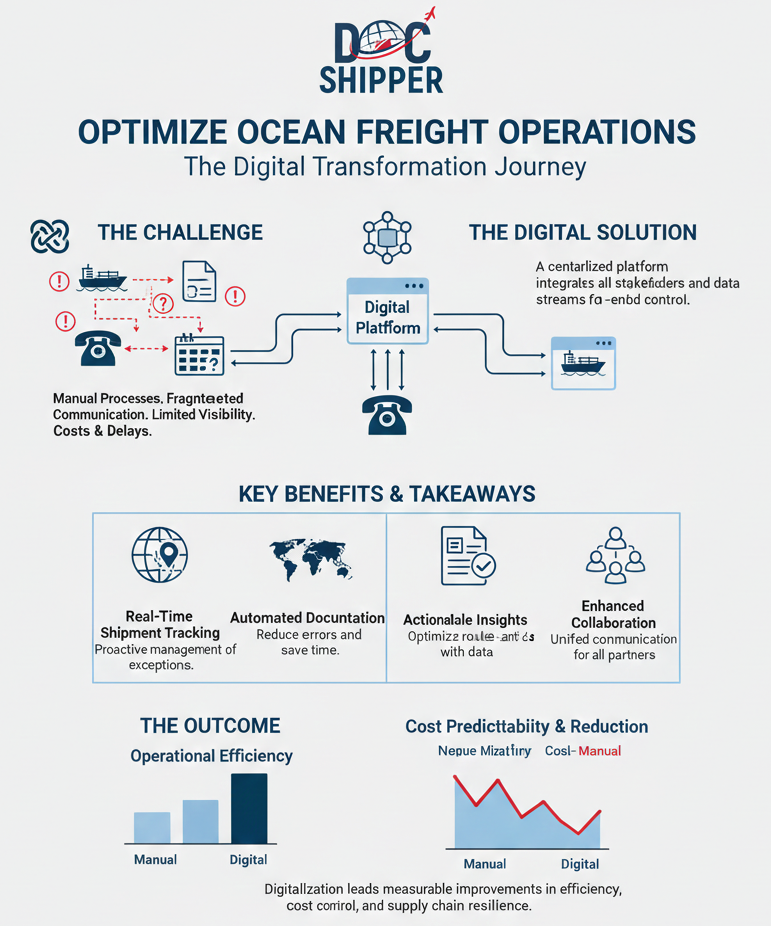
Ocean freight digitalization means running maritime logistics on shared data, connected systems, and standardized workflows instead of disconnected emails, PDFs, and spreadsheets. It turns each shipment into a digital process from freight quotation to customs clearance, using electronic documentation, EDI/API connectivity, real-time visibility, automation, and structured cost control to cut errors, rework, delays, and penalty charges.

We hope you’ll find this article genuinely useful, but remember, if you ever feel lost at any step, whether it’s finding a supplier, validating quality, managing international shipping or customs,  DocShipper can handle it all for you!

Free shipping quote 24h      I want to talk to a sourcing expert

What ocean freight digitalization really means for your business

Ocean freight digitalization means you stop running maritime logistics on disconnected emails, PDFs, and spreadsheets, and you run it on data, shared workflows, and system-to-system connections.

You’re basically turning each shipment into a digital process, from freight quotation to customs clearance, with fewer manual touches and fewer “who has the latest file?” moments.

Here’s a real scenario we see a lot at DocShipper. A shipper sends the same shipping instructions to the forwarder, the carrier portal, and the customs broker, then someone updates the HS code classification at the last minute, but only in one email thread. The result is predictable, a wrong cargo manifest version, a delayed customs declaration, and demurrage and detention bills nobody budgeted.

This is exactly where supply chain digitization pays off, because you replace fragile human handoffs with electronic documentation, structured data, and approvals that leave a trail.

To keep it practical, ocean freight operations digitalization usually covers these building blocks.

  • Electronic documentation: eBL (electronic bill of lading), shipping instructions, invoices, packing lists, certificates, and controlled versioning.
  • Connectivity: EDI (electronic data interchange) and API integration with carriers, terminals, and customs tools.
  • Visibility: vessel tracking, milestone events, and proactive alerts for ocean freight cargo tracking.
  • Execution: automated booking, slot allocation, schedule reliability monitoring, and exception management.
  • Finance control: rate management, freight contract governance, surcharge logic, and cost allocation.

If you’ve been chasing “shipping low cost digitalization,” this is the short answer, digitalization cuts cost where errors, rework, and idle time hide.

It’s also the point where you’ll notice fast which of your lanes, partners, and products are mature enough for automation, and which ones still need human control because of trade compliance risk.

UNCTAD has repeatedly highlighted how document handling and port processes drive friction in global trade, and you feel that friction every time one missing field blocks a release.

DocShipper Info

Turn your manual workflows into a digital process with DocShipper.
We centralize data, documents, and partner connections so your teams stop firefighting and start controlling costs, delays, and compliance across every shipment.

From paper to platforms: core components of a digital ocean freight stack
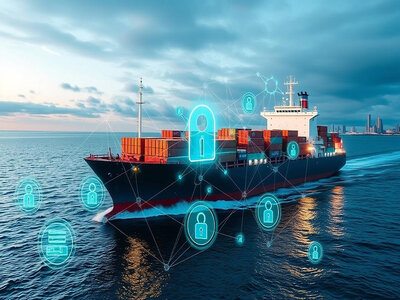
We once handled a shipment where the original Bill of Lading was stuck in a courier delay over a weekend, and the consignee couldn’t collect the container on Monday. That single document issue triggered detention charges, a warehouse reschedule, and a customer escalation.

With ocean freight digitalization, you replace those bottlenecks with a stack that behaves more like a digital freight forwarding operating system than a mailbox.

To make it concrete, your core modules usually look like this.

Digital component What it replaces What you gain in ocean freight operations
eBL (electronic bill of lading) and e-doc vault Couriered originals, scattered PDFs Faster release workflows, fewer disputes on versions, cleaner audit trails
Port community system connections Manual port status checks and phone calls Earlier visibility on holds, gate events, and terminal cut-offs
Carrier portal plus centralized booking layer Multiple logins and duplicate entries Standardized shipping instructions, fewer booking errors, better slot allocation control
Visibility platform with vessel tracking Static ETAs and “waiting for update” emails Better shipment visibility, earlier exception handling, improved schedule reliability monitoring
Document workflow automation Copy-paste forms and email approvals Faster customs clearance prep, fewer compliance misses, consistent data reuse
Freight management system and billing rules Manual accruals and invoice matching Cleaner cost and revenue management, fewer missed surcharges, faster variance detection

When you put these pieces together, you get repeatable workflows you can measure, improve, and scale, rather than heroic last-minute fixes.

DocShipper Info

Stuck between scattered PDFs and carrier portals, but no single source of truth.
DocShipper consolidates digital freight forwarding tools into one operating layer so your releases, bookings, and audits run smoothly.

Key technologies behind digital ocean freight (TMS, IoT, APIs, AI, blockchain)

Tip: Start by mapping which data you already have, then decide what you’ll pull via EDI or API integration before you buy anything new.

Most ocean freight digitalization programs fail because you buy tools first, then discover your master data is inconsistent, like shipper names, INCOTERMS, or container numbers living in five formats.

Here are the technologies that actually move the needle in maritime logistics, and what they’re good for.

  • TMS or freight management system: booking workflows, tendering, rate management, and freight quotation discipline across carriers and forwarders.
  • Cloud systems: shared data, role-based access, and fast deployment across regions and teams.
  • EDI: stable high-volume message exchange, like booking confirmations, BL drafts, status events, invoices.
  • API integration: more flexible, better for real-time vessel tracking and pulling schedule changes into your internal tools.
  • IoT sensors: door opens, temperature, shock, humidity, and location signals for sensitive cargo and claims prevention.
  • AI and automation: document reading, HS code classification suggestions, exception detection, and predictive analytics for delays.
  • Blockchain in shipping: strongest where you need trusted document provenance, like eBL chain-of-custody in multi-party handoffs.

You don’t need all of them on day one. You need the right mix for your lanes, cargo, and trade compliance exposure.

Practical benefits you can unlock with digital ocean freight operations
Ocean freight digitalization gets real when it changes your daily decisions, not when it adds another dashboard.

You’ll feel the difference in ocean freight operations when your team stops firefighting documents and starts managing exceptions, costs, and customer promises.

We’ve seen this play out with a consumer goods importer who had three people retyping the same shipment data into a forwarder template, a carrier portal, and an internal ERP. One typo in container management fields created a wrong pickup reference, and the truck missed the terminal slot, which turned into storage charges overnight.

That’s why shipping low cost digitalization is not just “automation for the sake of it.” It’s removing the quiet leaks that inflate your landed cost.

The World Bank has long linked trade friction to documentation and border processes, and you can literally watch that friction drop when your data becomes structured and reusable.


DocShipper Alert

Every manual rekeyed shipment detail is a hidden risk.
DocShipper connects quoting, booking, and documentation so one dataset feeds all partners, cutting demurrage, detention, and penalty costs before they appear.

Cost, speed, and accuracy gains across quoting, booking, and documentation

Bold statement: If quoting, booking, and documentation aren’t connected, you’re paying for the same work multiple times.

In practice, digital ocean freight operations reduce cost in two places, admin effort and penalty exposure, especially around demurrage and detention, late amendments, and mismatched invoices.

To make this actionable, here’s a step-by-step workflow you can aim for once systems are connected.

Workflow: from rate to sailing with fewer touches

  • Rate management: store tariff, contract, and surcharge rules by lane, carrier, and validity.
  • Freight quotation: generate quotes from the same rate logic, with INCOTERMS and accessorials enforced.
  • Automated booking: convert accepted quotes into bookings, push data to the carrier portal via EDI or API.
  • Document workflow automation: produce shipping instructions, BL drafts, cargo manifest data, and customs packs from one dataset.
  • Pre-clearance prep: validate HS code classification, trade compliance flags, and customs declaration fields early.
  • Invoice control: match carrier and forwarder invoices against contracted rules, then allocate to cost centers.

You also get fewer embarrassing back-and-forth cycles, like BL draft edits that eat days because someone has to “confirm with the shipper” on data that already exists in the TMS.

Looking for a Reliable Shipping & Sourcing Partner?

We handle the entire sourcing process, supplier research, negotiation, production, and inspections, so you can focus on what matters most: growing your business.

Better visibility, risk control, and customer experience through real-time data

What do you actually mean by “visibility,” and why does it keep slipping away once the container leaves the origin terminal?

In ocean freight digitalization, shipment visibility means you see the same truth as your partners, ETA shifts, transshipment risk, port holds, gate-in and gate-out, and you can act before your customer calls you.

This is where ocean freight cargo tracking becomes operational, not just informational. You connect vessel tracking, terminal operating system events, and carrier milestones into one timeline, then you trigger actions, like rebooking, customer updates, or customs brokerage escalation.

Use this checklist to validate whether you’re getting real-time value, or just nicer screens.

  • Milestones are standardized across carriers, not custom per partner.
  • Exception alerts fire on schedule reliability changes, rollovers, and port cut-off risks.
  • Container management includes gate events and terminal status, not just “departed” and “arrived.”
  • Customs clearance status is visible, including holds and document requests from your broker.
  • Carbon reporting is based on shipment data you can audit, not rough estimates.

When you reach that level, you’re not just tracking. You’re controlling risk, improving customer updates, and protecting margin.

And yes, this is also where industries that rely on ocean freight shipping software, like retail, automotive, chemicals, and electronics, finally get predictable ETAs they can plan inventory around.

DocShipper Advice

Visibility only pays off when it triggers concrete actions.
DocShipper connects vessel tracking, port events, and customs clearance into one timeline so your teams react before disruptions hit your inventory.

How to start digitalizing your ocean freight workflow step by step

You’ve probably lived this moment, a ship sails, emails pile up, and a missing BL version blocks customs, this is exactly where ocean freight digitalization starts making sense. From experience at DocShipper, the fastest wins come when you digitize flows before tools, not the other way around.

We once supported an importer who thought software alone would fix delays, but once we mapped his sea freight operations end to end, the gaps became obvious, which is also what UNCTAD highlights when it talks about process redesign before technology adoption.

Before touching any platform, here’s a simple checklist we use with clients to avoid common traps.

  • List your current documents and who creates, edits, and approves each one.
  • Identify manual handoffs between suppliers, forwarders, and customs brokers.
  • Decide what must be real‑time such as tracking or cost updates, and what can stay batch‑based.
  • Assign one owner per data flow to avoid parallel versions and guesswork.

Tools and platforms that help you manage and track ocean freight cargo

Here’s a direct tip, don’t chase every shiny platform you see at trade shows, anchor your ocean freight digitalization around the problems you feel every week. You’ll notice fast that visibility, document control, and freight cost management rarely live in one single system.

We’ve seen shippers stack tools without integration and end up blind again, which is why even the World Economic Forum keeps stressing interoperability and data sharing standards in maritime logistics.

To make the landscape easier to read, this comparison table shows how the main digital tools usually fit together.

Tool type Main value Where it helps most
Cloud TMS Centralized bookings and costs Quoting, execution, revenue control
IoT tracking Real‑time container status Delay alerts and risk prevention
EDI / APIs System‑to‑system data flows Documentation and carrier updates
AI analytics Prediction and anomaly detection Costs, transit times, exceptions

When these tools talk to each other, that’s when digital sea freight visibility becomes operational instead of theoretical.

DocShipper Info

Unsure which platforms to prioritize for real impact.
DocShipper selects and integrates cloud TMS, visibility, and tracking tools around your pain points so digital sea freight visibility becomes actionable, not cosmetic.

Conclusion

Digitalizing ocean freight is no longer optional if you want control. When you step back, ocean freight digitalization is really about cutting noise, not adding software, and creating one trusted stream of data you can actually act on.

At DocShipper, we’ve watched teams shift from reactive mode to calm execution once their freight processes went digital, a transformation also echoed in operational studies from the World Bank on trade facilitation.

To wrap things up clearly, here are the key takeaways you should keep in mind.

  • Start with workflows, not tools, or digital chaos will replace paper chaos.
  • Prioritize visibility and documents before advanced automation.
  • Choose interoperable platforms that grow with your volumes.
  • Measure gains fast in costs, delays, and customer satisfaction.

FAQ | Ocean freight digitalization: how to cut costs, gain visibility, and future‑proof your shipping

Software alone doesn’t shorten sailing times, but it cuts “hidden” days around the voyage. Focus on:

  • Before departure
  • Standardize booking cut‑offs and automate reminders to suppliers so containers hit the right vessel.
  • Use schedule reliability and dwell time data to choose services and ports that avoid chronic congestion.
  • Pre‑validate documents (commercial invoice, packing list, HS codes) to avoid customs holds at origin.
  • In transit
  • Use real‑time vessel and terminal data to spot ETA shifts early and rebook connections or trucking.
  • Automate alerts for transshipment risks and potential rollovers so you can intervene fast.
  • After arrival
  • Start customs pre‑clearance as soon as departure is confirmed instead of waiting for arrival.
  • Connect terminal, broker, and trucker via shared data so gate‑out is scheduled the moment the container is available.
  • Continuous improvement
  • Track “door‑to‑door” versus “port‑to‑port” time by lane and partner, then enforce performance clauses with data.

Ask us anything!

Need Help with
Logistics or Sourcing ?

First, we secure the right products from the right suppliers at the right price by managing the sourcing process from start to finish. Then, we simplify your shipping experience - from pickup to final delivery - ensuring any product, anywhere, is delivered at highly competitive prices.

Component-15.png

Live Chat

Get instant assistance from our team—just click and start chatting!

Live Chat Now
image

Fill the Form

Prefer email? Send us your inquiry, and we’ll get back to you as soon as possible.

Contact us
image
Component-15.png

Call us

Reach out to us on WhatsApp for quick, convenient, and personal support.

Call us
image
Component-15.png